

Acunetix Premium DAST/API Integration
Acunetix Premium is a comprehensive web application security scanner that detects a wide range of vulnerabilities, including SQL injection, XSS, and OWASP Top 10 issues. This integration enables Invicti ASPM to trigger Acunetix scans and import vulnerability findings automatically.
Prerequisites
| Field | Description |
|---|---|
| Acunetix Premium URL | The URL of your Acunetix Premium instance (e.g., https://acunetix.your-company.com) |
| API Key | An API key generated from your Acunetix Premium account |
How to Get an API Key (on Acunetix Premium Side)
- Log in to your Acunetix Premium web interface.
- Click your profile icon in the upper right corner.
- Select Profile from the dropdown menu.
- Scroll down to the API Key section.
- Copy the existing API key or click Generate to create a new one.
Step 1: Navigate to Integrations
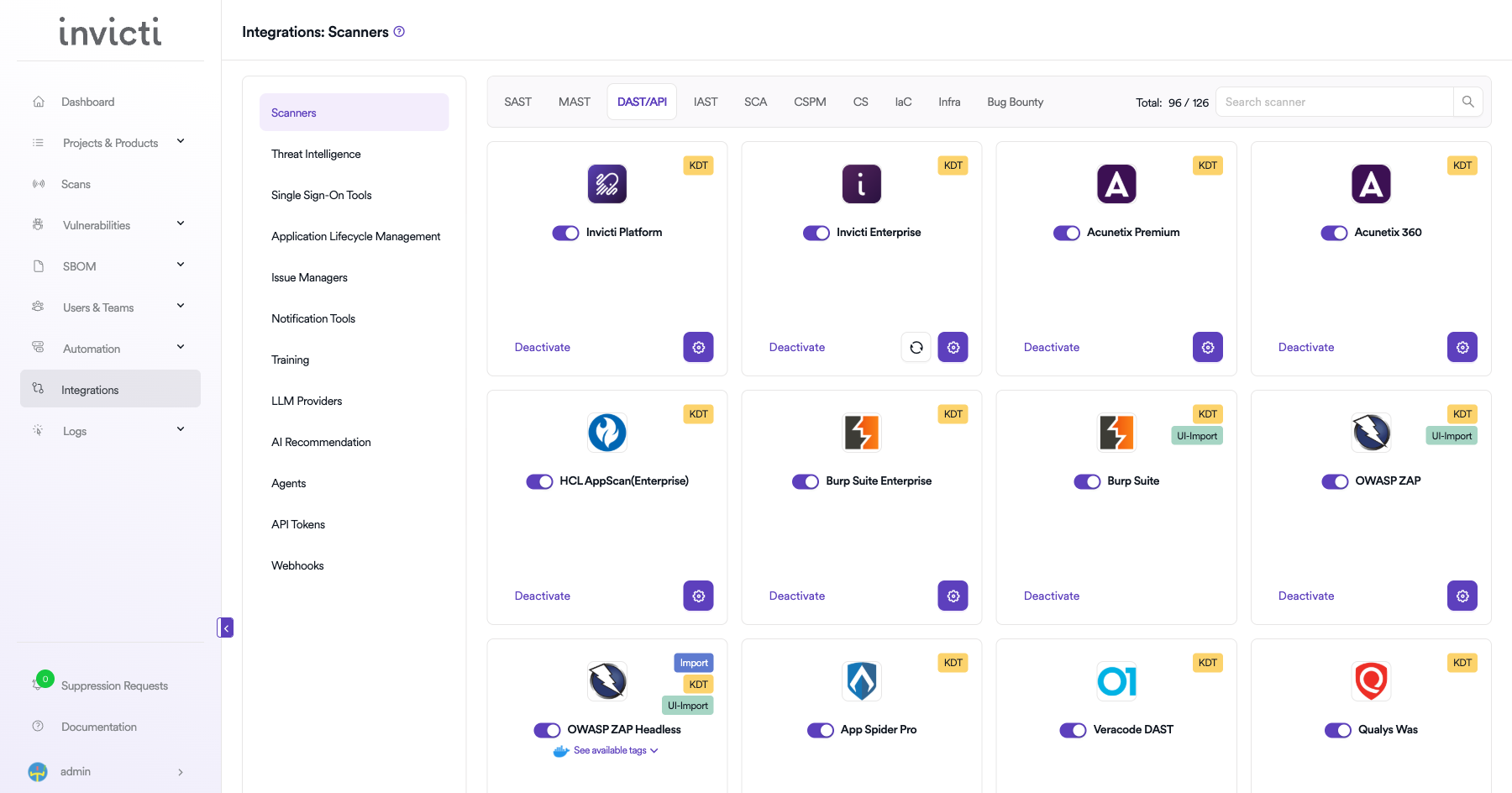
From the left sidebar menu, click on Integrations.
Step 2: Select the DAST/API Tab
On the Integrations > Scanners page, click on the DAST/API tab.
Step 3: Find and Activate Acunetix Premium
Scroll through the list of DAST/API scanners to find Acunetix Premium.
-
If Acunetix Premium is not activated, you will see an "Activate" button. Click it to enable the integration.
Note: The scan method badge on the Acunetix Premium card shows KDT, which means scans are triggered through the Kondukto CLI tool (KDT).
Step 4: Configure Connection Settings
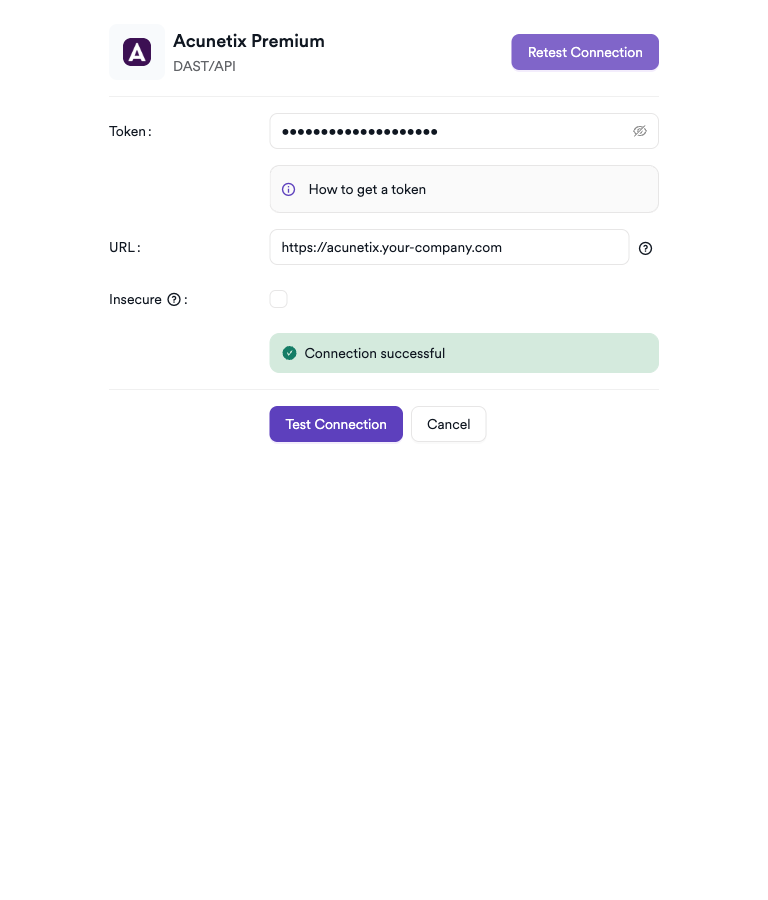
Click on the gear icon on the Acunetix Premium card to open the configuration panel. Fill in the required fields:
- Token: Paste the API token from your Acunetix Premium profile.
- URL: Enter the URL of your Acunetix Premium instance (e.g.,
https://acunetix.your-company.com). - Insecure: Enable this checkbox only if your Acunetix Premium instance uses a self-signed SSL certificate.
Step 5: Test the Connection
Click Test Connection. A green Connection successful message confirms the integration is working.
Summary
| Step | Action |
|---|---|
| 1 | Navigate to Integrations from the sidebar |
| 2 | Select the DAST/API tab |
| 3 | Activate Acunetix Premium |
| 4 | Enter URL and API Key |
| 5 | Test the connection |
How to Create a Scan
Navigate to Project Scanners
- Open a project in Invicti ASPM.
- Go to Settings > Scanners.
- Click Add Scanner.
Add Acunetix Premium Scanner
- Select DAST/API as the scanner type.
- Choose Acunetix Premium from the scanner list.
- Click Add to open the scan configuration drawer.
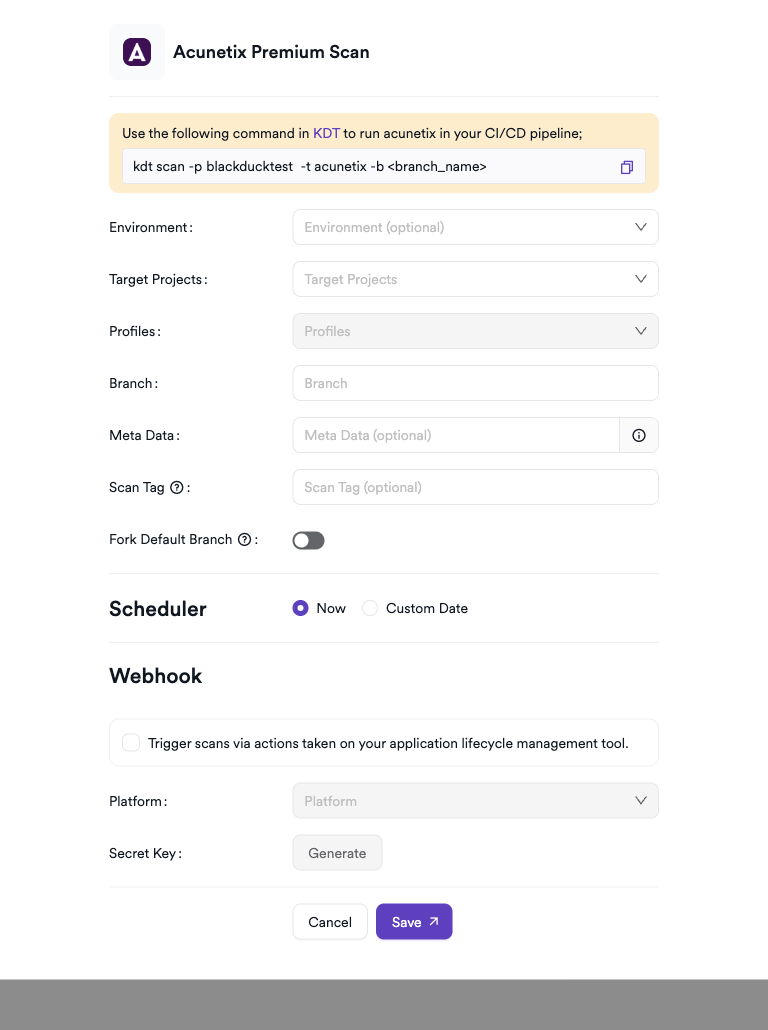
Scan Configuration Fields
| Field | Description | Required |
|---|---|---|
| Environment | Select the environment for the scan | No |
| Target Projects | Bind to an existing Acunetix project | Yes |
| Profiles | Scan profile to use (e.g., Full Scan, High Risk Vulnerabilities) | Yes |
| Branch | Source code branch associated with this scan | No |
| Meta Data | Additional metadata for the scan | No |
| Scan Tag | Tag to identify the scan | No |
Scheduler
Enable the Scheduler toggle to run scans on a recurring schedule.
Webhook (Optional)
Add a webhook URL to receive scan completion notifications.
KDT Command
kdt scan -p <project_name> -t acunetix -b <branch_name>Troubleshooting
Connection Fails
| Issue | Resolution |
|---|---|
| Invalid API key | Verify the API key in your Acunetix profile and update the settings |
| Wrong URL | Ensure the URL is correct and includes https:// |
| SSL errors | Verify the Acunetix instance uses a valid SSL certificate |
| Network/firewall | Ensure port 3443 (Acunetix default) is open from Invicti ASPM |
Scan Issues
| Issue | Resolution |
|---|---|
| Target not found | Ensure the target URL is already configured in Acunetix or create a new target |
| Scan not starting | Check Acunetix scan engine status and available scan slots |
| Empty results | Confirm the scan completed and results are available in the Acunetix dashboard |
| Permission issues | The API key must belong to an account with scan creation rights |
Best Practices
- Use a dedicated service account API key for the integration.
- Ensure target URLs are pre-configured in Acunetix before triggering scans from Invicti ASPM.
- Rotate the API key periodically and update the integration immediately after rotation.
- Use incremental scans for frequently updated applications to reduce scan duration.
- Schedule scans during off-peak hours to minimize impact on production environments.
Limitations
- Acunetix Premium requires targets to be pre-registered in the Acunetix interface before Invicti ASPM can trigger scans.
- Concurrent scan limits are defined by your Acunetix Premium license.
- API rate limits may affect bulk scan triggering.
- Only completed scan results are imported; partial or in-progress data is not retrieved.
Updated 7 months ago