

OpenRouter
OpenRouter is a unified API gateway that provides access to hundreds of large language models from various providers (OpenAI, Anthropic, Google, Meta, Mistral, and more) through a single API endpoint. The Invicti ASPM integration with OpenRouter enables AI-powered features — such as vulnerability remediation guidance and security analysis — with the flexibility to switch between models from different providers using one integration.
Purpose in Invicti ASPM
OpenRouter is used in Invicti ASPM as an LLM Provider — supplying the language model that powers AI-assisted security features, while offering access to a wide range of models through a single API key.
| Use Case | Description |
|---|---|
| AI remediation guidance | Generate fix recommendations for discovered vulnerabilities using any model available on OpenRouter |
| Security analysis | Use OpenRouter-hosted language models to assist in triage and prioritization of security findings |
| Model flexibility | Switch between models from different AI providers without managing multiple API keys |
Where It Is Used
| Page | Navigation Path | Purpose |
|---|---|---|
| Integrations — LLM Providers | Integrations › LLM Providers | Admin activation and model configuration |
Prerequisites
Before activating the integration, obtain an API key from your OpenRouter account:
| Field | Description | Required |
|---|---|---|
| Token | OpenRouter API key used to authenticate requests | Yes |
| Model | The model to use (selected after a successful test connection) | Yes |
How to Obtain the API Key (on the OpenRouter Side)
- Log in to your OpenRouter account at
openrouter.ai. - Navigate to Settings › API Keys (or click your profile icon › Keys).
- Click Create Key and give it a descriptive name (e.g.,
invicti-aspm). - Copy the key immediately — it will not be shown again after closing the dialog.
Note: OpenRouter charges per token based on the model used. Ensure your account has sufficient credits before activating the integration.
Activation Steps
Step 1: Navigate to Integrations
From the left sidebar, click Integrations.
Step 2: Open the LLM Providers Tab
On the Integrations page, click the LLM Providers tab.
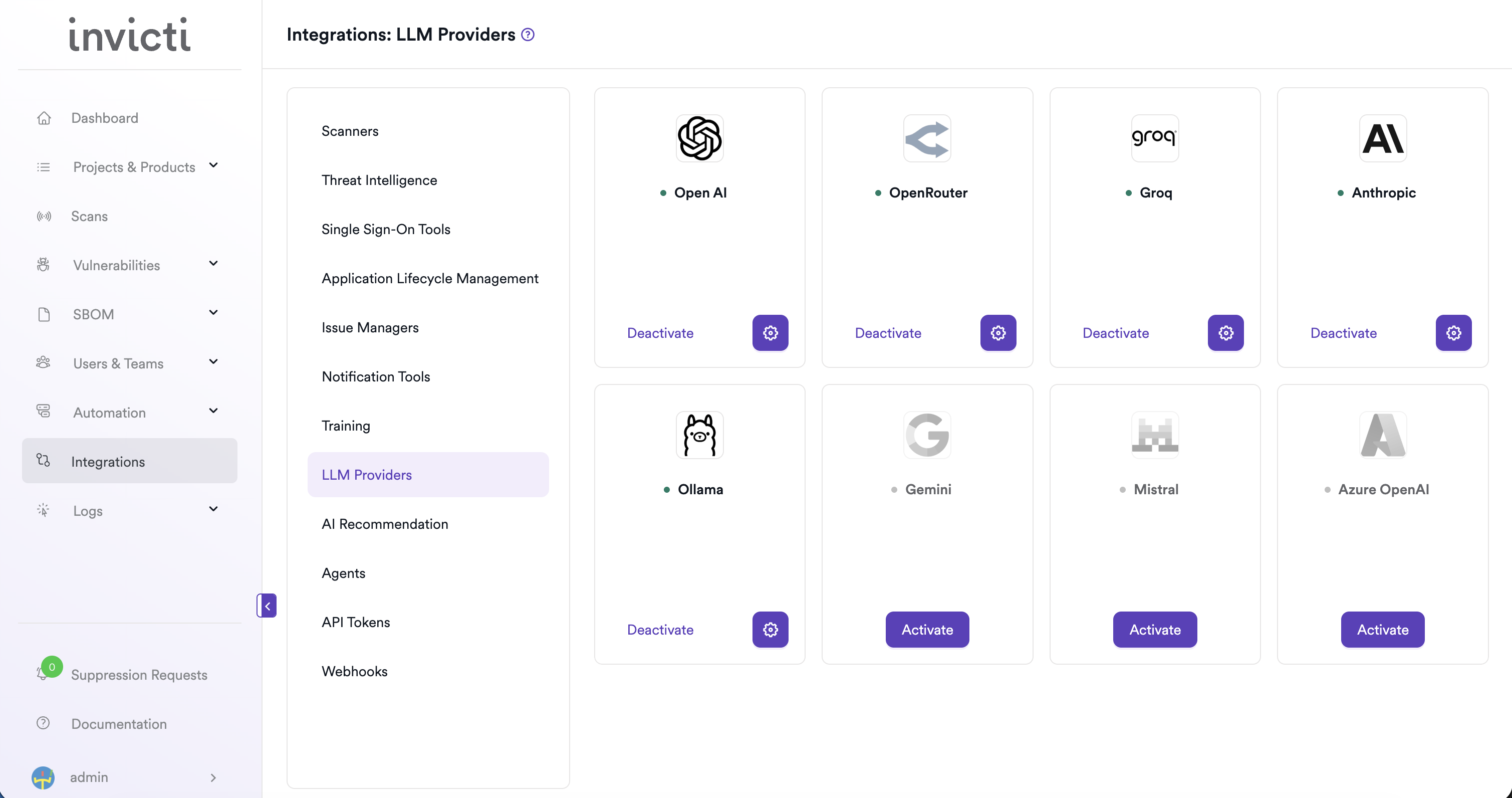
Step 3: Find and Activate OpenRouter
Locate the OpenRouter card.
- If it is not yet activated, click Activate to open the settings drawer.
- If it is already activated, click the gear icon to open the settings drawer and reconfigure.
Step 4: Fill In the Required Fields
In the settings drawer, enter your OpenRouter API key:
| Field | Description | Required |
|---|---|---|
| Token | Your OpenRouter API key | Yes |
Step 5: Test the Connection
Click Test Connection. A green "Connection successful" message confirms that Invicti ASPM can reach the OpenRouter API with the provided key. The Model dropdown will appear automatically after a successful test.
Step 6: Select a Model
From the Model dropdown, select the model you want to use for AI features in Invicti ASPM. OpenRouter provides access to models from multiple providers (e.g., openai/gpt-4o, anthropic/claude-3-5-sonnet, google/gemini-2.0-flash).
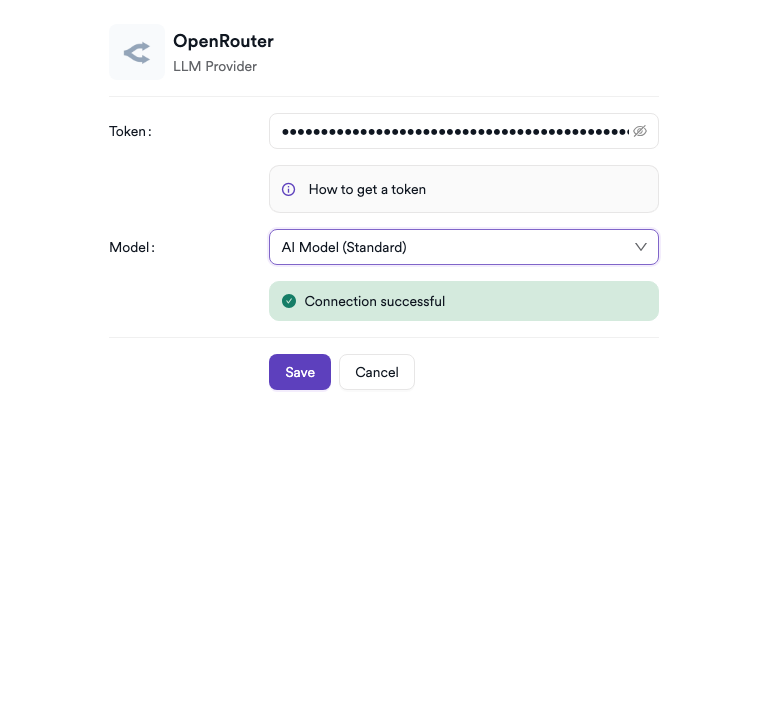
Step 7: Save
Click Save to complete the activation.
Summary
| Step | Action |
|---|---|
| 1 | Navigate to Integrations from the sidebar |
| 2 | Select the LLM Providers tab |
| 3 | Find OpenRouter and click Activate (or the gear icon) |
| 4 | Enter your OpenRouter API key in the Token field |
| 5 | Click Test Connection — verify the success message |
| 6 | Select a Model from the dropdown |
| 7 | Click Save |
Troubleshooting
| Issue | Resolution |
|---|---|
| Connection failed | Verify the API key is correct and has not been revoked. Regenerate it from the OpenRouter settings if needed. |
| Invalid API key | Ensure the key was copied in full without extra spaces or characters. |
| No models available | Confirm your OpenRouter account is active and has sufficient credits. Some models may require specific subscription tiers. |
| 401 Unauthorized | The API key may have expired or been disabled. Generate a new key and update the configuration. |
| Insufficient credits | OpenRouter is a pay-per-use service. Add credits to your OpenRouter account to continue using the integration. |
| Model not available | Some models on OpenRouter have limited availability or require separate access requests. Choose an alternative model from the dropdown. |
Updated 6 months ago