

OWASP ZAP DAST/API Integration
OWASP ZAP (Zed Attack Proxy) is a widely used open-source DAST tool for finding vulnerabilities in web applications. In Invicti ASPM, OWASP ZAP runs as an agent-based or KDT-managed scanner, meaning no external service credentials are required — scans are executed directly by the Invicti ASPM agent.
Important: OWASP ZAP is an Agent/KDT-based scanner. It does not require connection to an external service. Scans are executed by the Invicti agent installed in your environment or via KDT.
Prerequisites
| Requirement | Description |
|---|---|
| Invicti Agent | An Invicti ASPM agent must be installed and running in the target environment |
| Target URL | The web application URL that the agent can reach and scan |
| Docker | Docker must be installed on the agent host (ZAP runs as a Docker container) |
Step 1: Navigate to Integrations
From the left sidebar menu, click on Integrations.
Step 2: Select the DAST/API Tab
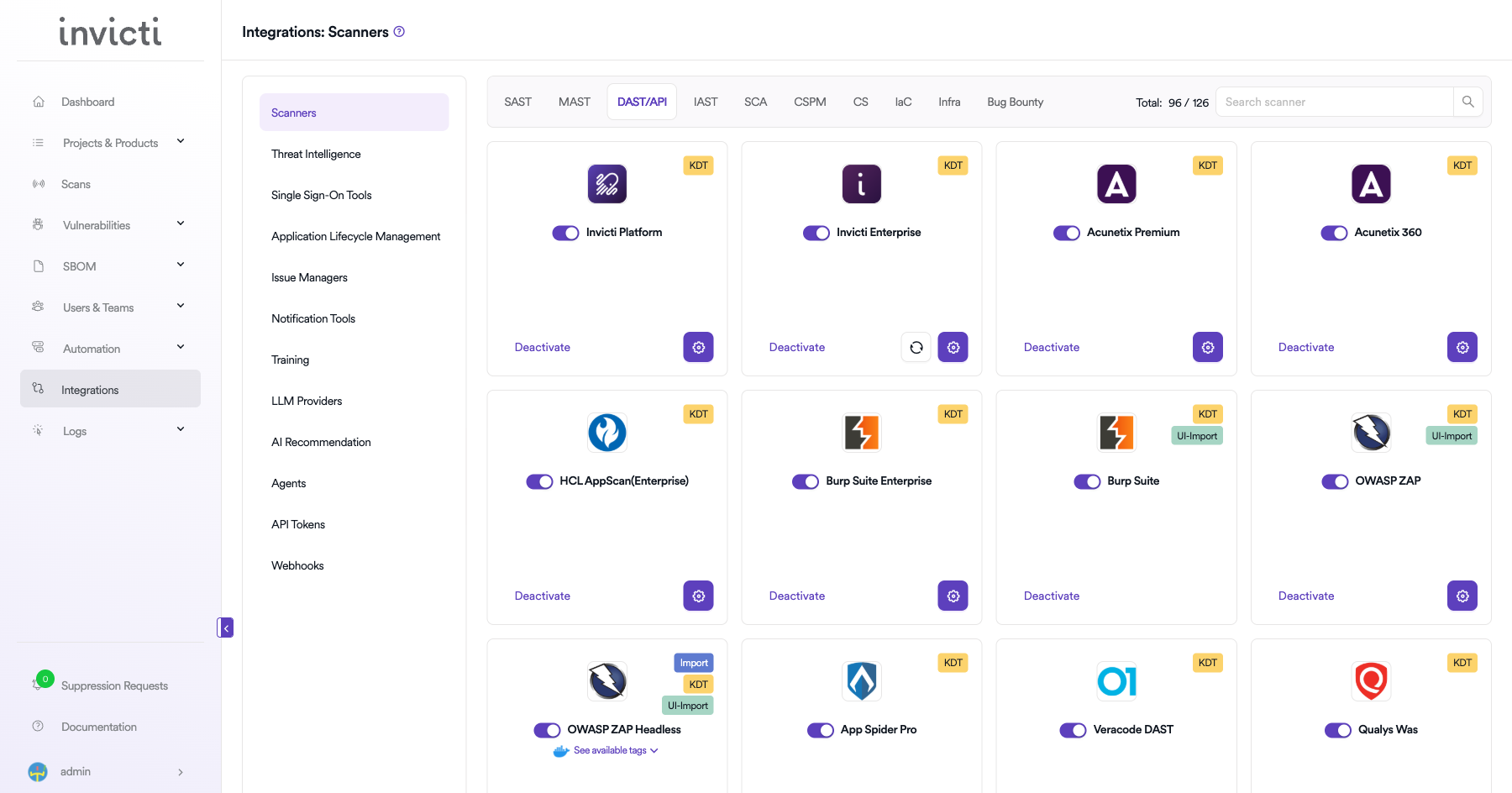
On the Integrations > Scanners page, click on the DAST/API tab.
Step 3: Find and Activate OWASP ZAP
Scroll through the list of DAST/API scanners to find OWASP ZAP.
-
If OWASP ZAP is not activated, you will see an "Activate" button. Click it to enable the integration.
Note: The scan method badge on the OWASP ZAP card shows KDT, which means scans are triggered through the Kondukto CLI tool (KDT).
Step 4: Configure Connection Settings
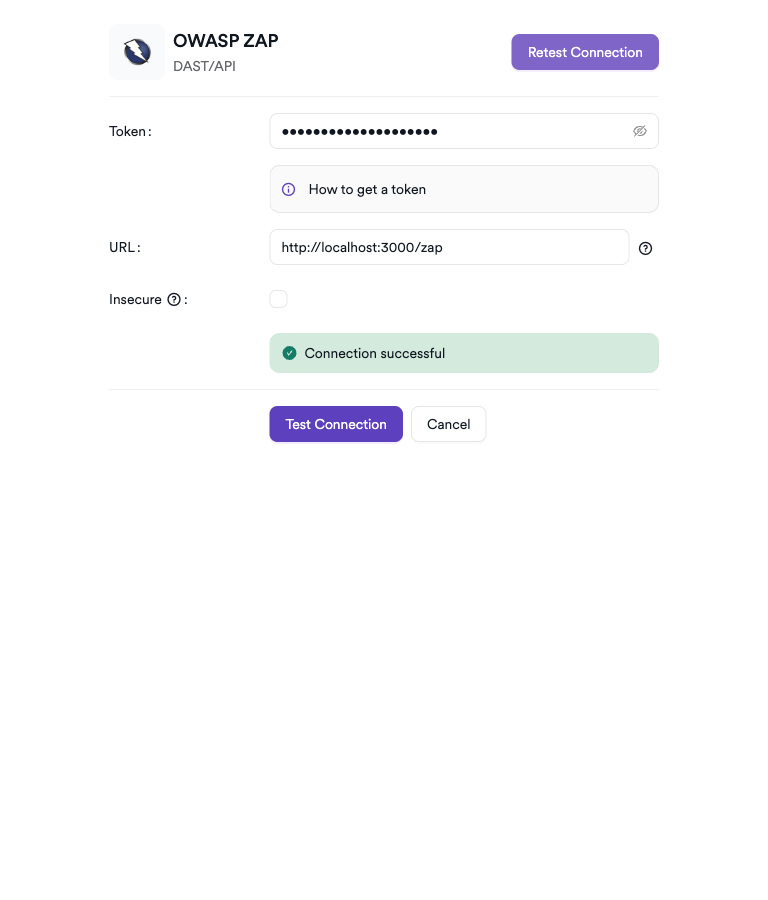
Click on the gear icon on the OWASP ZAP card to open the configuration panel. Fill in the required fields:
-
Token: Paste the API token from your OWASP ZAP instance.
-
URL: Enter the base URL of your OWASP ZAP instance.
-
Insecure: Enable this checkbox only if your OWASP ZAP instance uses a self-signed SSL certificate.
Step 5: Test the Connection
Click Test Connection. A green Connection successful message confirms connectivity.
Summary
| Step | Action |
|---|---|
| 1 | Navigate to Integrations from the sidebar |
| 2 | Select the DAST/API tab |
| 3 | Activate OWASP ZAP |
| 4 | Enter Token, URL, and optional Insecure setting |
| 5 | Test the connection |
How to Create a Scan
Navigate to Project Scanners
- Open a project in Invicti ASPM.
- Go to Settings > Scanners.
- Click Add Scanner.
Add OWASP ZAP Scanner
- Select DAST/API as the scanner type.
- Choose OWASP ZAP from the scanner list.
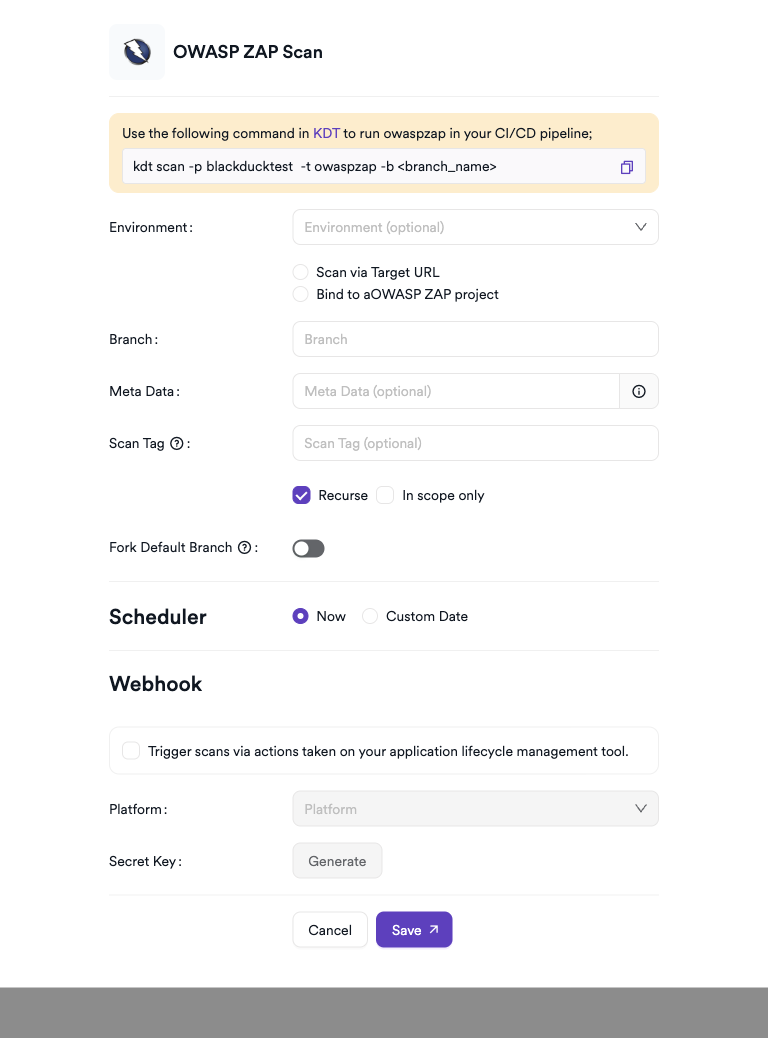
- Click Add to open the scan configuration drawer.
Scan Configuration Fields
| Field | Description | Required |
|---|---|---|
| Environment | Select the environment for the scan | No |
| Scan Type | Scan via Target URL or Bind to an existing project | No |
| Target URL | Web application URL to scan (if Scan Type = Target URL) | Conditional |
| Bind To | Project to bind to (if Scan Type = Bind to project) | Conditional |
| Branch | Source code branch associated with this scan | No |
| Meta Data | Additional metadata for the scan | No |
| Scan Tag | Tag to identify the scan | No |
Scheduler
Enable the Scheduler toggle to run ZAP scans on a recurring schedule.
Webhook (Optional)
Add a webhook URL to receive scan completion notifications.
KDT Command
kdt scan -p <project_name> -t zap -b <branch_name>Troubleshooting
Scan Issues
| Issue | Resolution |
|---|---|
| Agent not available | Ensure the Invicti agent is installed, running, and connected to Invicti ASPM |
| Docker not found | Install Docker on the agent host and ensure the Docker daemon is running |
| Target not reachable | Verify the target URL is accessible from the agent host (check network/firewall rules) |
| Image pull failed | Ensure the agent host has internet access to pull the ZAP Docker image from Docker Hub |
| Scan timeout | Increase the scan timeout setting or reduce the scan scope |
| Empty results | Use Standard or Full scan mode for more comprehensive coverage |
Best Practices
- Run OWASP ZAP scans in Baseline mode for quick CI/CD pipeline checks.
- Use Full scan mode for scheduled comprehensive security assessments.
- Pin the ZAP Docker image tag to a specific version to ensure reproducible scan results.
- Ensure the agent host has sufficient resources (CPU, RAM) for Docker-based scanning.
- Combine ZAP results with other scanners for broader coverage.
Limitations
- OWASP ZAP requires Docker to be installed on the agent host.
- The target application must be reachable from the agent host network.
- Authenticated scan setup (login scripts, session handling) must be configured manually.
- Scan depth and thoroughness are limited by ZAP's crawling capabilities for complex JavaScript-heavy applications.
- False positive rates may be higher compared to commercial DAST tools; result triaging is recommended.
Updated 7 months ago