

Mend SCA
Invicti ASPM supports Mend (formerly WhiteSource) as an SCA (Software Composition Analysis) scanner. This guide explains how to activate and configure the Mend integration.
Mend is an enterprise-grade software composition analysis platform that helps organizations manage open-source security, license compliance, and code quality risks. It provides continuous monitoring of open-source components and automated policy enforcement.
Important: This Mend SCA integration works with API v2 (
/api/v2.0). Ensure your Mend instance supports the v2 API before configuring this integration.
Prerequisites:
Before starting the integration, ensure you have the following information from your Mend account:
| Field | Description | Required |
|---|---|---|
| Username | Your Mend account email address | Yes |
| User Key | Your Mend user key for API authentication | Yes |
| Api Key | The organization API key from your Mend account | Yes |
| URL | Your Mend instance URL (e.g., https://saas.mend.io) | Yes |
| Insecure | Skip SSL certificate verification (not recommended for production) | No |
Admin or Manager role recommended.
How to Get Credentials (on Mend Side)
- Log in to your Mend account.
- Navigate to Administration > Integration to find the organization API Key.
- Go to your Profile settings to find your User Key.
- Your Username is the email address associated with your Mend account.
- The URL is your Mend instance base URL (e.g.,
https://saas.mend.iofor SaaS or your on-premises URL).
Obtaining User Key:
To obtain a User Key, you need to access the Mend SCA platform and navigate through your user profile settings. Follow these steps:
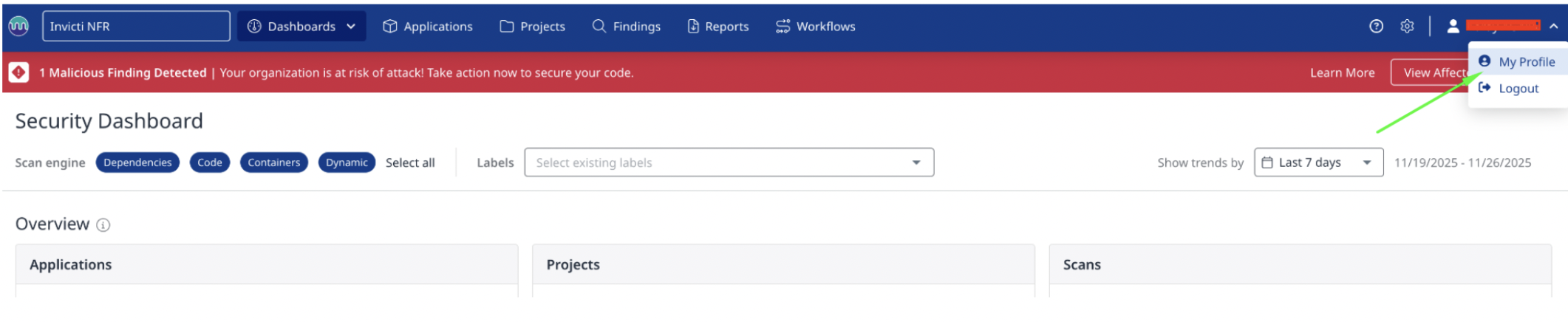
- Login to Mend SCA platform at White Source Software Website.
- Click on your user profile icon in the top right corner of the screen
- Select My Profile from the dropdown menu
Once you're on the Profile page, you'll see several tabs in the left sidebar. The User Keys section is where you can manage all your API authentication keys.
- Locate the left sidebar menu on the Profile page
- Find and click on the User Keys tab
- The User Keys page will display all your existing keys and creation options
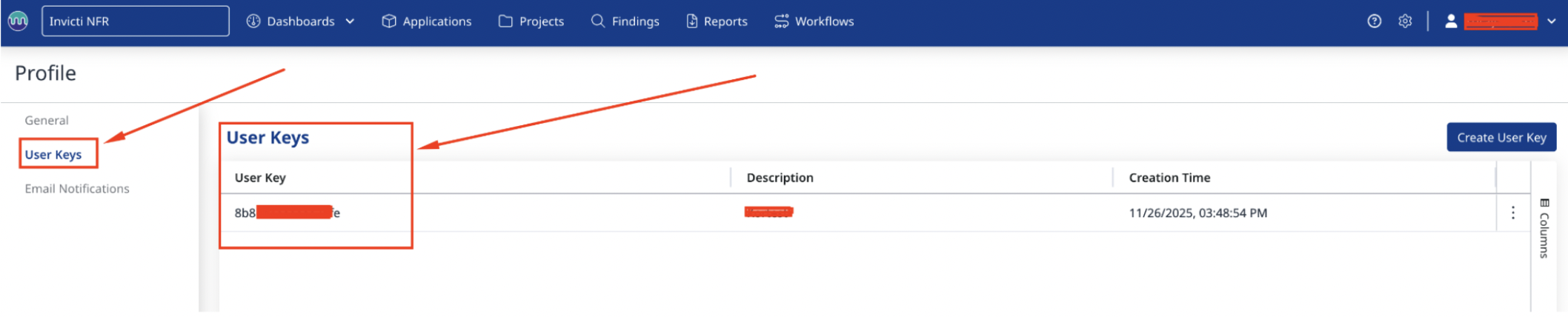
Creating a new User Key is straightforward. Each key can be labeled with a description to help you identify its purpose.
- On the User Keys page, click the "Create User Key" button located in the top right corner
- Enter a meaningful description for the key (e.g., 'Invicti ASPM Integration' )
- Click confirm to generate the key
- Copy and securely store the generated User Key immediately
The User Key will be displayed only once. If you lose it, you must create a new key and update all integrations. Store it in a secure password manager or key vault immediately.
Step 1: Navigate to Integrations
From the left sidebar menu, click on Integrations.
Step 2: Select the SCA Tab
On the Integrations page, you will see the Scanners section with multiple tabs. Click on the SCA tab.
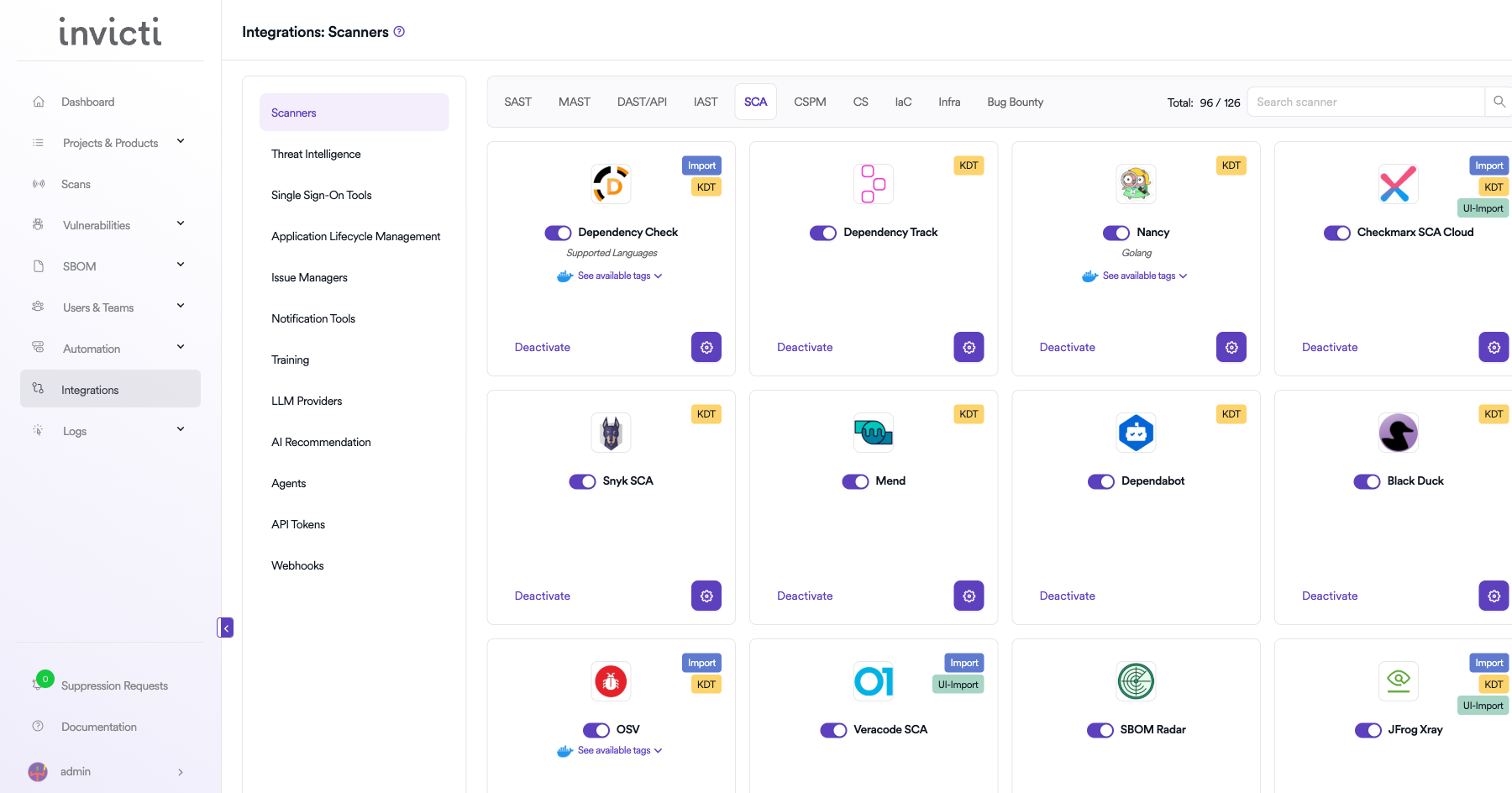
Step 3: Find and Activate Mend
Scroll through the list of SCA scanners to find Mend.
- If Mend is not activated, you will see an "Activate" button. Click it to enable the integration.
- If Mend is already activated, you will see a toggle switch in the ON position and a "Deactivate" button, along with a gear icon for configuration.
Note: The scan method badge on the Mend card shows KDT, which means scans are triggered through the Kondukto CLI tool (KDT).
Step 4: Configure Connection Settings
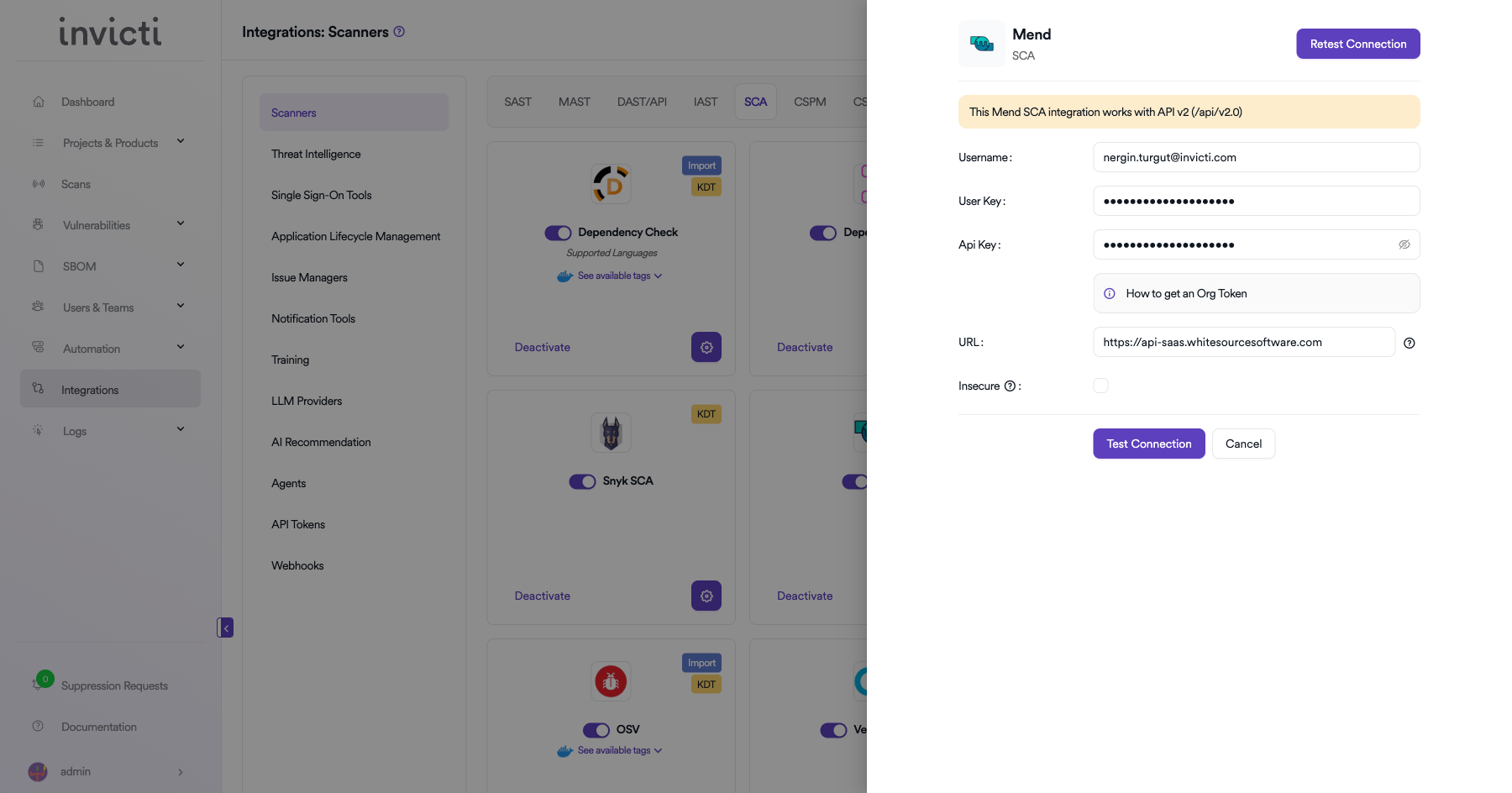
Click on the gear icon on the Mend card to open the configuration panel.
Info: This Mend SCA integration works with API v2 (
/api/v2.0).
Fill in the required fields:
- Username: Enter your Mend account email address.
- User Key: Paste your Mend user key.
- Api Key: Paste the organization API key from your Mend account.
- URL: Enter your Mend instance URL (e.g.,
https://saas.mend.io). - Insecure: Enable this checkbox only if your Mend instance uses a self-signed SSL certificate.
Step 5: Test the Connection
Click the "Test Connection" button at the bottom of the configuration panel to verify that the provided credentials and URL are correct.
- If the connection is successful, the integration is ready to use.
- If the connection fails, verify your Username, User Key, Api Key, and URL values.
- For existing integrations, you can use the "Retest Connection" button at the top of the panel.
Step 6: Advanced Settings (Optional)
Click on "Advanced Settings" to expand additional options:
| Setting | Description | Default |
|---|---|---|
| Allow team leads to scan this instance | Permits team leads to trigger scans using this Mend instance | Off |
| Allow team leads to create new instances | Permits team leads to create additional Mend instances | Off |
After modifying advanced settings, click "Save Advanced Settings" to apply changes.
Summary
| Step | Action |
|---|---|
| 1 | Navigate to Integrations from the sidebar |
| 2 | Select the SCA tab under Scanners |
| 3 | Find Mend and click Activate (if not already active) |
| 4 | Click the gear icon and fill in Username, User Key, Api Key, URL, and optionally Insecure |
| 5 | Click Test Connection to verify |
| 6 | (Optional) Configure Advanced Settings for team lead permissions |
Updated 6 months ago